Customer Service Automation Software: A Complete Guide for Businesses
Customer service automation works best when it removes repetitive tasks without removing the human side of support. Businesses should automate common questions and routine processes while keeping their teams available for conversations that require judgment, empathy, or personal attention.
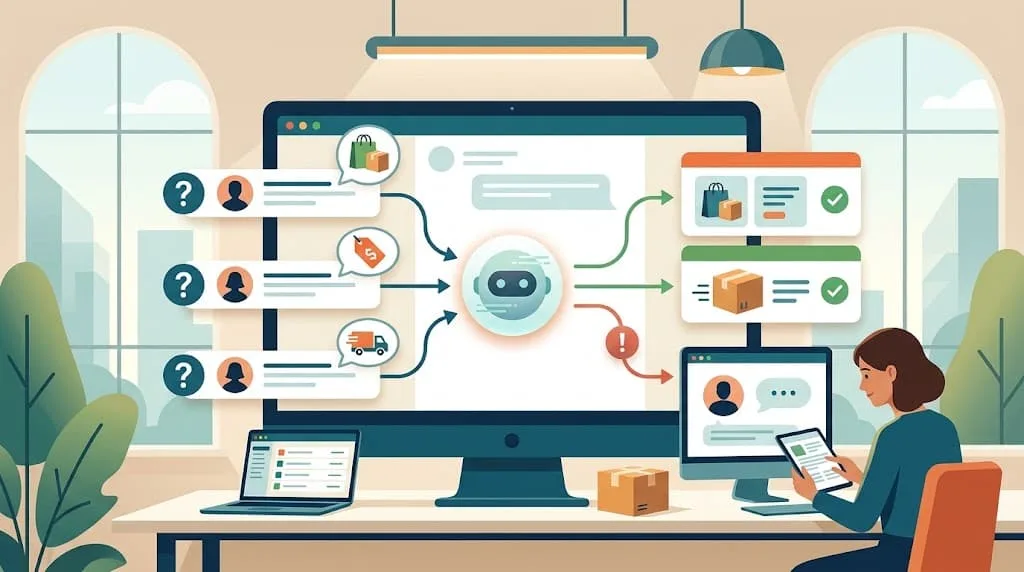
Customer service can become one of the most time-consuming parts of running an online business. Customers want quick answers, but business owners and support teams cannot stay available every minute of the day. As message volume grows, answering the same questions repeatedly can take hours that could be spent on sales, operations, or improving the business.
This is where customer service automation software can make a practical difference.
Customer service automation software helps businesses handle repetitive customer interactions automatically. Instead of manually answering every question about products, pricing, delivery, availability, or ordering, businesses can use automation to provide immediate responses and guide customers through common processes.
For businesses that receive a large number of inquiries through Facebook Messenger, automation can be especially useful. A platform such as Reply.BD can use AI to understand customer messages, provide product information, recommend relevant products, collect order details, and allow a human team member to take over when necessary.
The goal of customer service automation is not to remove people from customer support. It is to reduce repetitive work so people can spend more time on conversations where human judgment actually matters.
Table of Contents
-
What Is Customer Service Automation Software?
-
How Does Customer Service Automation Work?
-
Why Do Businesses Need Customer Service Automation?
-
Common Customer Service Tasks You Can Automate
-
Benefits of Customer Service Automation Software
-
Customer Service Automation for Facebook Messenger
-
AI vs. Rule-Based Customer Service Automation
-
Features to Look for in Customer Service Automation Software
-
How to Choose the Right Software
-
How Reply.BD Helps Automate Customer Conversations
-
Common Mistakes to Avoid
-
Frequently Asked Questions
-
Final Thoughts
What Is Customer Service Automation Software?
Customer service automation software is a technology solution that helps businesses automatically manage repetitive customer communication and support tasks.
Depending on the platform, automation can include answering frequently asked questions, providing product information, collecting customer details, routing conversations, sending notifications, and assisting customers through specific workflows.
Modern systems can also use artificial intelligence to understand natural-language questions rather than depending entirely on exact keywords or predefined buttons.
For example, an online seller may receive all of these questions:
-
“How much is this?”
-
“Price please”
-
“Ei product er dam koto?”
-
“dam koto?”
-
“What is the price of this product?”
Although the wording is different, the customer is asking the same basic question.
An AI-powered customer service system can recognize the intent and provide the relevant product price when that information is available.
This makes automation more flexible than a basic system that only responds when a customer uses an exact keyword.
How Does Customer Service Automation Work?
The exact process depends on the software, but a typical automated customer service workflow has several stages.
1. Customer Starts a Conversation
A customer sends a message through a supported channel such as Facebook Messenger, a website chat interface, or another connected communication channel.
2. The System Understands the Request
The software analyzes the customer's message to determine what they are asking.
For AI-powered systems, this can involve understanding the context rather than simply matching a keyword.
3. Business Information Is Used
The system uses information supplied by the business.
This may include:
-
Product names
-
Prices
-
Product descriptions
-
Available variants
-
Delivery information
-
Business policies
-
Frequently asked questions
-
Ordering instructions
The quality of automated customer service depends heavily on the accuracy of this information.
4. An Automated Response Is Sent
The system provides an appropriate answer or guides the customer to the next step.
For example, it may answer a product question, recommend an item, or explain how to place an order.
5. Human Support Takes Over When Needed
Automation should have limits.
If a customer has a complicated complaint, requests something outside the available information, or wants to speak directly with a representative, the conversation can be handed over to a human.
This creates a balance between automation and personal support.
Why Do Businesses Need Customer Service Automation?
Customer expectations have changed significantly with the growth of online commerce.
When someone sends a message to a business, they often expect a response within minutes rather than hours. For a small business owner managing everything personally, maintaining that level of responsiveness can be difficult.
Customers Ask the Same Questions Repeatedly
Online businesses often receive questions such as:
-
What is the price?
-
Is this available?
-
What colors are available?
-
How much is delivery?
-
How can I order?
-
Do you deliver outside Dhaka?
-
What payment methods do you accept?
Answering these questions manually every day creates a significant amount of repetitive work.
Automation allows businesses to handle common inquiries without typing the same answer repeatedly.
Customers Contact Businesses Outside Working Hours
A customer may see a product at midnight and immediately want to ask a question.
If nobody is available to respond, the customer may move on to another seller.
Automated customer service can continue handling supported inquiries even when the business owner is offline.
Growing Message Volume Becomes Difficult to Manage
A business may be able to manage 20 conversations per day manually.
Managing hundreds of conversations is a different challenge.
Automation provides a way to handle routine conversations at a larger scale without increasing the support workload at the same rate.
Common Customer Service Tasks You Can Automate
Automation works best when it is applied to repetitive, predictable tasks.
Frequently Asked Questions
Businesses can automate responses to common questions about:
-
Products
-
Services
-
Prices
-
Delivery
-
Payment
-
Business hours
-
Ordering procedures
-
Policies
This gives customers quick access to basic information.
Product Information
For an online store, customers frequently ask for product details before buying.
An AI system connected to an accurate product catalog can provide information about available products, prices, variants, and other relevant details.
Product Recommendations
Sometimes customers do not know exactly what they want.
Instead of asking for a product name, they may describe what they need.
For example:
“I need something for a small office.”
An AI-powered system can ask follow-up questions and recommend relevant products based on the information available to it.
Order Collection
Customer service automation can also support the transition from inquiry to purchase.
For example, once a customer decides to buy, the system can collect information such as:
-
Customer name
-
Phone number
-
Delivery address
-
Selected product
-
Product variant
This reduces the amount of manual data entry required by the business.
Basic Lead Qualification
Service businesses can use automation to ask initial questions before sending a lead to a salesperson.
For example, a business might ask what service the customer needs, what type of business they operate, and how soon they need assistance.
The sales team can then focus on leads that are more relevant.
Benefits of Customer Service Automation Software
The main benefit of automation is not simply sending more messages. It is improving how a business handles customer communication.
Faster Response Times
One of the clearest benefits is speed.
An automated system can respond immediately to supported customer questions instead of making customers wait for a team member.
Fast responses are particularly important for online sellers because customers can easily compare several businesses before deciding where to purchase.
Lower Repetitive Workload
Employees can spend a large part of their day answering questions that have already been answered many times.
Automating these conversations gives the team more time to focus on complicated customer issues, sales conversations, fulfillment, and other business activities.
24/7 Customer Communication
Automation allows businesses to maintain customer communication outside normal working hours.
This is especially useful for businesses that receive messages from customers throughout the day and night.
More Consistent Answers
When several employees answer customer questions, the information they provide may sometimes differ.
A centralized automated system can provide responses based on the same business information and instructions.
Businesses still need to keep their information updated, but automation can help maintain greater consistency.
Easier Order Handling
For businesses that sell through Messenger, collecting customer information automatically can simplify the path from conversation to order.
Instead of copying names, phone numbers, and addresses manually from chats, an automated workflow can collect the required information and organize the order.
Better Scalability
A business should not need to hire another support employee every time message volume increases slightly.
Automation can absorb a large portion of routine inquiries, allowing the existing team to manage a higher volume of customer interactions.
Customer Service Automation for Facebook Messenger
Facebook Messenger is an important customer communication channel for many businesses in Bangladesh, particularly businesses that sell through Facebook Pages.
Customers often discover products through Facebook posts and advertisements and then continue the conversation through Messenger.
This creates a natural opportunity for customer service automation.
Instead of using Messenger only to send a basic greeting, businesses can automate more useful parts of the conversation.
For example:
Customer: “Bhaiya, ei product er dam koto?”
Automated system: Provides the relevant product price.
Customer: “Available ache?”
Automated system: Checks the available product information and responds.
Customer: “Nibo.”
Automated system: Starts collecting the information required to process the order.
This type of automation connects customer service with the sales process.
Reply.BD is built specifically around this type of Facebook Messenger communication. Its AI can respond in Bangla, English, and Banglish, use product catalog information, recommend products, and collect customer order details.
AI vs. Rule-Based Customer Service Automation
Not all automation works in the same way.
Traditional automation generally follows predefined rules.
For example:
Customer: “Price”
System: Sends a predefined price message.
This can work for simple situations, but it becomes difficult when customers phrase questions differently.
AI-based automation is designed to understand more natural variations.
| Area | Rule-Based Automation | AI-Powered Automation |
|---|---|---|
| Response method | Predefined rules | AI interprets customer messages |
| Different wording | Limited | More flexible |
| Context | Usually limited | Can understand conversation context |
| Product recommendations | Usually predefined | Can use product information to recommend |
| Complex conversations | Difficult | Better suited to conversational interactions |
| Human handoff | Depends on platform | Available on suitable platforms |
| Best for | Simple repetitive tasks | More flexible customer conversations |
This does not mean AI should be used for everything.
Simple automated rules can still be useful for straightforward tasks. AI becomes more valuable when customers communicate in different ways and the business needs the system to understand context.
Features to Look for in Customer Service Automation Software
Choosing automation software based only on the word “AI” can lead to the wrong decision.
Businesses should look at the actual capabilities.
AI-Powered Responses
The system should understand natural customer questions and provide relevant answers based on the information available to it.
Product Catalog Support
For e-commerce businesses, the system should be able to work with product information.
Reply.BD allows businesses to upload product catalogs with images and variants, which the AI can use during customer conversations.
Order Collection
If the purpose of automation includes sales, the software should support the transition from customer inquiry to order.
Reply.BD's order workflow can collect a customer's name, phone number, and address and create the order in the business dashboard.
Human Takeover
No automated system should be expected to handle every conversation.
Human takeover gives a team member the ability to step into a conversation when necessary. Reply.BD provides a one-click human takeover option that pauses the AI and automatically resumes after the configured idle period.
Analytics
Automation should be measurable.
Businesses should be able to see useful information such as conversation activity, responses, and conversions.
Reply.BD provides dashboard analytics for replies sent, conversations converted, and AI usage.
Multilingual Communication
For businesses serving Bangladeshi customers, language support can have a major impact on the quality of conversations.
Reply.BD supports Bangla, English, and Banglish, allowing customers to communicate in the language they naturally use.
Data Protection
Customer service software may handle names, phone numbers, addresses, and conversation histories.
Businesses should review the provider's data practices before connecting customer communication to any platform. Reply.BD states that customer data is encrypted and that it does not sell customer data. Its privacy policy also explains what information the platform stores and how it is used.
How to Choose the Right Customer Service Automation Software
There is no single automation platform that is perfect for every business.
The right choice depends on where your customers communicate, what questions they ask, and what parts of the customer service process you want to automate.
Start With Your Biggest Support Problem
Do not start by looking at software features.
Start by identifying the problem.
Are customers waiting too long for responses?
Are employees spending hours answering the same questions?
Are Facebook messages being missed?
Are potential customers asking questions but never completing an order?
The answer will help determine what type of automation you actually need.
Identify Your Main Communication Channel
If most customer conversations happen through Facebook Messenger, choosing a platform designed around Messenger can make more sense than using a generic support system that focuses primarily on email or ticket management.
Review Your Most Common Questions
Look through your recent customer conversations.
Identify the questions that appear repeatedly.
Those questions are strong candidates for automation.
Test the AI With Real Customer Messages
Do not test a chatbot only with perfectly written questions.
Use the language your customers actually use.
For a Bangladeshi business, that may include Bangla, English, Banglish, abbreviations, spelling variations, and short messages such as “price?”, “available?”, or “nibo”.
This will give you a much better idea of whether the system is suitable for your audience.
Make Sure Humans Can Step In
Automation should make support easier, not create a barrier between customers and your team.
Always consider how a human representative can take over a conversation when needed.
How Reply.BD Helps Automate Customer Conversations
Reply.BD is designed for businesses that receive customer inquiries through Facebook Messenger and want to automate repetitive communication while keeping the sales process connected.
The platform can respond to customer messages using AI, understand conversations in Bangla, English, and Banglish, and use product information to answer questions and recommend relevant products.
For an online seller, the workflow can extend beyond customer support.
A customer may ask about a product, receive the price, ask about availability, decide to purchase, and then provide their name, phone number, and address.
Reply.BD can support this entire Messenger conversation and create an order in the dashboard once the required information has been collected.
This is an important distinction between basic customer service automation and sales-oriented automation.
The system is not only designed to answer questions. It can help businesses move customers from the first message toward a completed order.
Built for Bangladeshi Customer Conversations
Customer communication in Bangladesh is not limited to formal Bangla or English.
People commonly switch between Bangla, English, and Banglish within the same conversation.
Reply.BD is designed to handle these languages naturally, which can make automated responses more appropriate for local customers.
Human Control Remains Available
Automation does not mean giving up control.
If a customer needs personal assistance, a business owner or team member can take over the conversation. Reply.BD allows the AI to be paused with one click, after which it can resume automatically following the configured idle period.
More Than Customer Service Automation
Reply.BD also provides e-commerce website and advertising landing-page services.
This allows businesses to build a broader online sales system where websites and landing pages support customer acquisition while Messenger automation handles conversations and order-related communication.
Businesses can start by connecting a Facebook Page and testing the platform through its seven-day free trial without a credit card.
Common Mistakes to Avoid
Automating Without Accurate Information
AI cannot compensate for incorrect business information.
If your product price is wrong in the catalog, the automated response can also be wrong.
Keep product details, prices, availability, and policies updated.
Trying to Automate Every Customer
Some customers have unique requirements.
Some may have complaints or questions that require human judgment.
The purpose of automation should be to handle appropriate conversations, not force every customer through an automated process.
Choosing Software Based Only on Price
The cheapest platform may not solve your actual problem.
Consider the channels supported, AI capabilities, product limits, message limits, analytics, human takeover, and overall workflow.
Ignoring Customer Language
If customers communicate primarily in Banglish but your automation only works well with formal English, the customer experience may suffer.
Always test the software using real customer communication.
Measuring Message Volume Instead of Results
A high number of automated replies does not automatically mean successful customer service.
Businesses should also look at:
-
Response speed
-
Questions resolved
-
Leads generated
-
Orders collected
-
Conversations converted
-
Human handoffs
-
Customer satisfaction
The goal is better customer communication, not simply more automated messages.